
A few months ago, I discovered that Cloudflare has a "managed transform" rule that'll inject HTTP headers for the location information associated with the visitor's IP address. From the HTTP headers — CF-IPCountry, CF-Region, and CF-IPCity — I can get the two-character country code, state, and city, respectively. What I didn't realize until I looked at the logs is that these header values aren't UTF-8 encoded, they're ISO-8859-1 encoded. As such, I have to explicitly convert them to UTF-8 in my ColdFusion application.
HTTP Headers Have No Standard Encoding
As far as I understand, HTTP headers have no standard encoding. According to ChatGTP, header values are either passed-through as an opaque set of bytes; or, they're interpreted as (Latin-1) ISO-8859-1 due to an historical (but no longer mandated) HTTP/1.1 specification. In the context of an Adobe ColdFusion 2025 application running on a Windows VPS behind IIS, it's possible that IIS is mistakenly decoding the UTF-8 bytes injected by Cloudflare.
Which is to say, what I'm doing in this post may not be generally applicable. HTTP headers should be evaluated and transformed on an as-needed basis.
Converting Between ISO-8859-1 and UTF-8
ColdFusion provides native methods for encoding and decoding character encodings. As such, converting between ISO-8859-1 and UTF-8 is just a matter of decoding the ISO-8859-1 value back into a byte-array and then re-encoding the byte-array into a UTF-8 string.
I had trouble testing this locally with a CFHttp tag; but, luckily the Page Speed Plus website will ping any URL for free from several locations around the world — one of which is São Paulo. This gave me an opportunity to see how the accented character, ã, could be transformed on my ColdFusion server.
To test, I put together the following CFML script. It looks at two HTTP headers injected by Cloudflare — CF-IPCity and CF-Region — and outputs both the original value and the charset-converted value:
<cfscript>

	// Get incoming HTTP request headers.
	headers = getHttpRequestData( false ).headers;

	// Get geographic headers injected by Cloudflare transformer.
	ipCity = ( headers[ "CF-IPCity" ] ?: "" );
	ipRegion = ( headers[ "CF-Region" ] ?: "" );

	writeOutput( "<h1> Cloudflare Charset Conversion </h1>" );
	writeDump([
		[
			original: ipCity,
			converted: charsetConvert( ipCity, "iso-8859-1", "utf-8" )
		],
		[
			original: ipRegion,
			converted: charsetConvert( ipRegion, "iso-8859-1", "utf-8" )
		]
	]);

	// ------------------------------------------------------------------------------- //
	// ------------------------------------------------------------------------------- //

	/**
	* I convert the given string from one charset to another.
	*/
	public string function charsetConvert(
		required string input,
		required string fromEncoding,
		required string toEncoding
		) {

		return charsetEncode( charsetDecode( input, fromEncoding ), toEncoding );

	}

</cfscript>
When I deploy this to my IIS server and ping it with Page Speed Plus, here's the result I see from São Paulo:
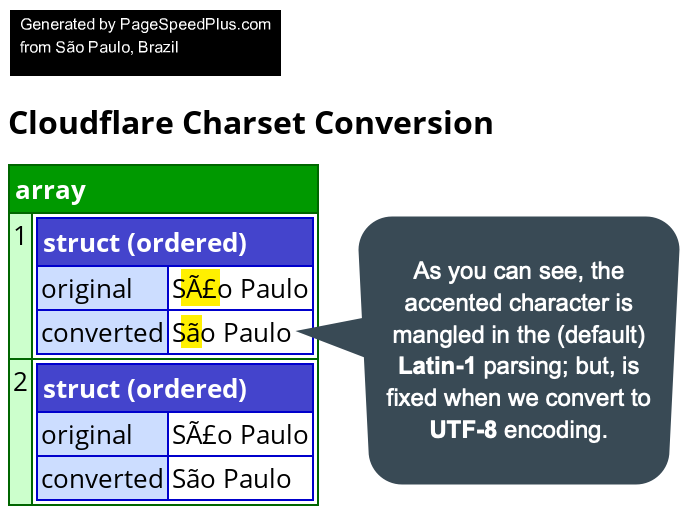
As you can see in the screenshot, the original HTTP header decoding exposed by ColdFusion's getHttpRequestData() function mangled the accented character in "São Paulo". But, by decoding the value back into bytes and then re-encoding it as UTF-8, I'm able to access the proper string value.
Again, I don't think that you can universally apply this approach to all incoming HTTP headers. I'm applying it here, to Cloudflare's location headers, because they've proven to be problematic in my Adobe ColdFusion 2025 + IIS application context. Your mileage may vary depending on your web server, reverse proxies, and ColdFusion version.

Reader Comments
These are the changes that I made to Big Sexy Poems to cast the Latin-1 encoding to UTF-8 encoding:
Commit
ec5961You should be able to create a transform response override in Cloudflare to force the header to utf-8.
@Spills,
Oh interesting - a good point to raise. That said, I do think there is something nice about having this code in the source control. Since I'm just a single person, I try to keep as much as I can in the code itself so that I don't have to remember where all this logic is the next time I set up a site.
But, I also acknowledge that I'm only using like 1% of what Cloudflare can do 😆
@Ben Nadel, One thing about Cloudflare is that their API is amazing and you could probably do a whole site setup script using their API.
Nice to meet you, Ben. Your blog is very helpful and, honestly, it's valuable that it's been going for so long. I've started a few blogs myself over the years, but I usually give up after about a year. btw, I've recently been assigned a project at work using CFML. It's a system running on jQuery + Railo + Postgres that manages production volumes for machine parts. It graphs production output monthly and has user management features.
It's a project that needs refactoring. I want to migrate to Lucee, and the Postgres version is still outdated. To make maintenance easier, I also need to shift from jQuery to a reactive language like Vue. and, I want to run Lucee on GraalVM and use its JS Engine to simplify parameter checks for form values sent to the database.
However, I question CFML's future viability. Searching GitHub for CFML projects/repo yields fewer results than other languages. CFLib.org exists, but... where can I find reference source code and libraries useful for learning?
How long ago was the CFML project you worked on created? The project I'm responsible for was created over ten years ago and still uses CFML today. Have you ever been forced to migrate to another framework? For example, when adding features that were simply too difficult to implement in CFML.
btw, I really like Railo's admin interface—it's easy to navigate. I had to manually replace DLLs because the ODBC driver was outdated, but I'm worried some APIs or features might break when migrating from Railo to Lucee. Honestly, I don't have anyone outside the company I can easily consult about CFML when I get stuck. Plus, the enginner who handled it has already left, and that's how I ended up finding this blog while googling.
I'm currently building my own blog in my own way. I was wondering, did you create this blog yourself, Is it CFML-based? If that's the case, what prompted it? You could have used existing blog services like Blogspot or WordPress.
@Yusuke,
If you're curious to see some CFML code, I have the source code for my Big Sexy Poems application on GitHub:
https://github.com/bennadel/app.bigsexypoems.com/
It's an application I am building primarily for myself; and it allows me to try new things - it's where I ran into this HTTP header issue. If you look back up at the first comment, I have link to the GitHub commit that I used to fix the header encoding issue.
It has no framework - or, I should say - it's using unofficial patterns to put the site together. There are several large CFML frameworks; but, I always feels like the frameworks are a little too much when you're just building for yourself. Plus, building my own thing forces me to think creatively, which is the whole point of having side-projects.
I personally love CFML, but it is a small community for sure. As far as resources, I know there's a Slack community for CFML, but I'm not much of a chat person. Mostly, I just Google for things as-needed. The Ortus Solutions books are likely to be good - Ortus is one of the main pillars of the CFML community.
I wrote a book about Feature Flags; which isn't specific to CFML, but all the examples are in CFML.
My best suggestion is always just to build something. All the best learning happens when you build (in my experience).
It looks like this is not in the Cloudflare free plan. All I can get is the country value.
@Chris,
It's in the Free plan, but not enabled by default. You have to go into:
bigsexypoems.com).Then there should be a few checkboxes. You have to enable the one called Add visitor location headers. Then, the other HTTP headers should start showing up.
@Ben Nadel,
Thanks for the helpful advice and links.
As for bigsexypoems.com, well, I've hardly written any poetry myself and wasn't born in an English-speaking country, so I was a bit confused about how to use it. But I'm sure this piece is "My best suggestion is always just to build something. All the best learning happens when you build (in my experience)."
I'll study CFML by watching your LinkedIn and YouTube videos, then come back to this blog.
Found it. nice. thanks!
Post A Comment — ❤️ I'd Love To Hear From You! ❤️
Post a Comment →