
Ask Ben: Creating A PDF And Attaching It To An Email Using ColdFusion
Do you know how to save a cfdocument and then attach it to a cfmail all on submit?
This is one of the many tasks that ColdFusion happens to make very easy. We can use the CFDocument tag to generate the PDF and store it in memory; then, we can use the CFMail tag and the CFMailParam tag to attach our generated PDF to the outgoing email. With the release of ColdFusion 8, we were given the ability to attach variable data directly to emails using the CFMailParam Content attribute without going to the file system; this means that all of the above can be done without worrying about temporary files, unique file names, I/O errors, or any of the other hassles that go along with physical file interaction.
Here is a very simple ColdFusion form that gathers data from the user, converts that data into a PDF-based "Certificate" using CFDocument, and then sends out the certificate using CFMail:
<!--- Param form values. --->
<cfparam name="form.submitted" type="boolean" default="false" />
<cfparam name="form.type" type="string" default="" />
<cfparam name="form.name" type="string" default="" />
<cfparam name="form.email" type="string" default="" />

<!--- Create an array to hold our form validation errors. --->
<cfset errors = [] />


<!--- Check to see if the form has been submitted. --->
<cfif form.submitted>

	<!--- Validate the form data. --->

	<!--- Validate certificate type. --->
	<cfif !len( form.type )>

		<cfset arrayAppend(
			errors,
			"Please enter the type of Certificate that you want to create. Example: World's Greatest Butt."
			) />

	</cfif>

	<!--- Validate name. --->
	<cfif !len( form.name )>

		<cfset arrayAppend(
			errors,
			"Please enter the name that will be displayed on the certificate."
			) />

	</cfif>

	<!--- Validate email. --->
	<cfif !isValid( "email", form.email )>

		<cfset arrayAppend(
			errors,
			"Please enter a valid email address to whom the certificate will be sent."
			) />

	</cfif>


	<!--- Check to see if we have any form errors. --->
	<cfif !arrayLen( errors )>

		<!---
			Since we don't have any errors's let's create the
			certiciate as a PDF using the CFDocument tag. We're
			going to assign the document content to a variable
			so that we can attach it to the email without going
			to the file system.
		--->
		<cfdocument
			name="certificate"
			format="PDF"
			pagetype="custom"
			pageheight="5"
			pagewidth="6.5"
			margintop="0"
			marginbottom="0"
			marginright="0"
			marginleft="0"
			unit="in"
			fontembed="true"
			backgroundvisible="true"
			localurl="true">

			<cfoutput>

				<!DOCTYPE html PUBLIC "-//W3C//DTD XHTML 1.0 Transitional//EN" "http://www.w3.org/TR/xhtml1/DTD/xhtml1-transitional.dtd">
				<html>
				<head>
					<style type="text/css">

						body {
							background-image: url( "certificate.jpg" ) ;
							background-position: center center ;
							background-repeat: no-repeat ;
							font-family: arial ;
							margin: 0px 0px 0px 0px ;
							padding: 0px 0px 0px 0px ;
							}

						div##name,
						div##type,
						div##day,
						div##month,
						div##year {
							position: absolute ;
							text-align: center ;
							}

						div##name,
						div##type {
							font-size: 24px ;
							font-weight: bold ;
							}

						div##day,
						div##month,
						div##year {
							font-size: 14px ;
							}

						div##name {
							left: 185px ;
							top: 152px ;
							width: 255px ;
							}

						div##type {
							left: 162px ;
							top: 225px ;
							width: 300px ;
							}

						div##day {
							left: 172px ;
							top: 268px ;
							width: 50px ;
							}

						div##month {
							left: 282px ;
							top: 268px ;
							width: 145px ;
							}

						div##year {
							left: 440px ;
							top: 268px ;
							width: 57px ;
							}

					</style>
				</head>
				<body>

					<div id="name">
						#form.name#
					</div>

					<div id="type">
						#form.type#
					</div>

					<div id="day">
						#day( now() )#
					</div>

					<div id="month">
						#monthAsString( month( now() ) )#
					</div>

					<div id="year">
						#year( now() )#
					</div>

				</body>
				</html>

			</cfoutput>

		</cfdocument>


		<!---
			Now that we have the content of our CFDocument-generated
			certificate in our certificate variable, we can easily
			attach it to the outgoing email.
		--->
		<cfmail
			to="#form.email#"
			from="info@certificiates.com"
			subject="Congratulations #form.name#!"
			type="html">

			<h1>
				Congratulations #form.name#,
			</h1>

			<p>
				You have been awarded the attached certiciate of
				appreciation!
			</p>


			<!---
				Attach the content of the CFDocument tag to the
				outgoing email.
			--->
			<cfmailparam
				file="certificiate.pdf"
				type="application/pdf"
				content="#certificate#"
				/>

		</cfmail>


		<!---
			The form has been successfully procesed, so forward
			to confirmation page.
		--->
		<cflocation
			url="confirmation.cfm"
			addtoken="false"
			/>

	</cfif>

</cfif>


<cfoutput>

	<!--- Set the content and reset the output buffer. --->
	<cfcontent type="text/html" />

	<!DOCTYPE html PUBLIC "-//W3C//DTD XHTML 1.0 Transitional//EN" "http://www.w3.org/TR/xhtml1/DTD/xhtml1-transitional.dtd">
	<html>
	<head>
		<title>ColdFusion CFDocument And CFMail Demo</title>
	</head>
	<body>

		<h1>
			ColdFusion CFDocument And CFMail Demo
		</h1>

		<p>
			Please fill out the following form and a
			"Certificate of Appreciation" will be automatically
			created and emailed to the given address.
		</p>


		<!--- Check to see if we have any form errors. --->
		<cfif arrayLen( errors )>

			<h3>
				Please review the following:
			</h3>

			<ul>
				<cfloop
					index="error"
					array="#errors#">

					<li>
						#error#
					</li>

				</cfloop>
			</ul>

		</cfif>


		<form action="#cgi.script_name#" method="post">

			<!--- The form submission flag. --->
			<input type="hidden" name="submitted" value="true" />

			<p>
				<label>
					Certificate:<br />
					<input
						type="text"
						name="type"
						value="#form.type#"
						size="40"
						maxlength="50"
						/>
				</label>
			</p>

			<p>
				<label>
					Name:<br />
					<input
						type="text"
						name="name"
						value="#form.name#"
						size="40"
						maxlength="50"
						/>
				</label>
			</p>

			<p>
				<label>
					Email:<br />
					<input
						type="text"
						name="email"
						value="#form.email#"
						size="40"
						maxlength="100"
						/>
				</label>
			</p>

			<p>
				<input type="submit" value="Send Certificate" />
			</p>

		</form>

	</body>
	</html>

</cfoutput>
By supplying the CFDocument tag with a Name attribute, Coldfusion will store the generated PDF document as a binary variable in the supplied variable name, "certificate." Then, using the Content attribute of the CFMailParam tag, we can take that binary ColdFusion variable and attach it directly to the outgoing email.
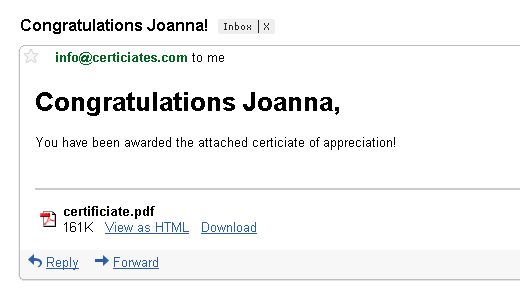
Running the above code, I end up with the following email:
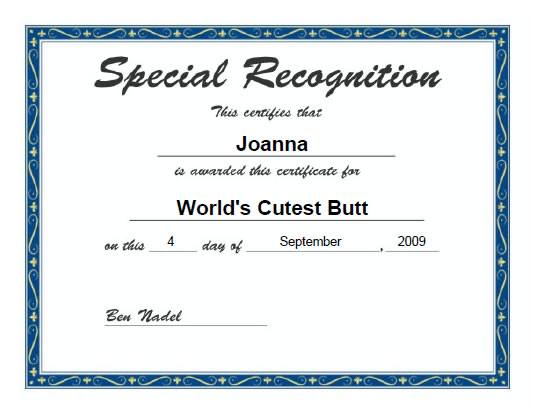
... which has the following PDF attachment:
Works like a charm. I hope that helps.
Want to use code from this post? Check out the license.

Reader Comments
I'm not sure why I noticed this, but I like how the cfmail tag is sending the email from info@certificiates.com and the screenshot shows the email coming from info@certiciates.com. What exactly were you trying to spell? Certificates? A little over excited for the long weekend?
Aside from that, nice example.
@Ben,
Just a nitpick about something we both know - but which can cause some unintended confusion in someone who isn't on his guard.
========
Coldfusion will store the generated PDF document as a binary variable in the supplied variable name, "certificate."
========
ColdFusion will store the generated PDF document as a binary value, which is referenced by the variable named "certificate".
Values are data, while variables are containers for data or pointers to data.
Justice
This is a slight variation on the technique we use on WillYourself.com
Works well.
@Tony,
Yeah, I noticed that right after I posted the blog entry. I went back to fix it in the code and was too lazy to make the screen shot again - I had to run out for dinner plans. I see, however, now that I even misspelled the correction with in the code. Ooops :)
@Justice,
Ahh, good point - you always keep me vigilant on my fast-and-lose use of language.
@Gary,
Yeah, ColdFusion makes this stuff so simple.
thank you man
Where can I meet this Joanna at?
-- Nice tutorial simple stuff.
Will this work in CF7?
I was under the impression that any code AFTER a closing cfdocument tag would not execute.
@Jody - I'm with you. Where's Joanna?
@Brian,
It depends on when the "name" attribute was added. I think no processing post-CFDocument would only occur if you were outputting the content of the PDF to the browser.
But, more importantly, you cannot use the Content attribute of the CFMailParam until CF8. As such, you would need to write the PDF to file and then use the File attribute instead.
Wow thx for this great resource ! so useful ! I put it in my bookmarks...
The content attribute is really awesome! Is possible to refer me to sample code to achieve the same result in coldfusion 7 MX?
Thanks
@Johan,
I don't know of a way to accomplish this pre-CF8 without writing the file to disk and using the File attribute, sorry.
Have you got any reference to code explaining the procedure to use cfdocument, file to disk and attach to email?
@Johan,
I don't think I have one off hand. Basically, you'd just want to use the File attribute of CFDocument to save the PDF to disk. Then, you'd want to use the File attribute of CFMailParam to attach it to the mail.
Just be careful about deleting the file; if you plan to delete the file right after sending out the email, you have to turn OFF spoolenable on the mail (otherwise you'll delete the file before the mail goes out).
Is anyone having trouble with Sandbox Security with this?
pass access denied (java.io.FilePermission test.pdf read)
@Galen,
Is this on a file you just created? Or one that was existing?
@Ben,
I'm following your method and trying to attach the generated pdf without using the file system at all. So no "test.pdf" file is being created.
@Galen,
Hmmm, that's really weird. I wonder if CFDocument needs file permissions even to run (perhaps for scratch file space). I have not heard of that. Are you sure you're not using the FileName attribute on the CFDocument tag?
What code item is the error being thrown on? The PDF creation? Or the email attachment? Can you see this in the stack trace?
@Ben,
I'm not using the filename attribute of CFDocument; the error is being thrown at the line file="certificiate.pdf" inside CFMailparam.
I'm baffled. Thanks for the feedback.
@Galen,
I am as baffled as you. ColdFusion must be trying to write the PDF to a temp file or something and cannot access the file (write permissions). Very odd though.
Try outputting the temp directory to see what directory it is:
#getTempDirectory()#
This *might* be where CF is trying to create a temp file. Make sure the directory exists.
Ben,
How is it possible that every time I search for completely new issues I run into with CF, you already have an article on it. Amazing my man. Keep up the good work. Your site is a valuable asset to the CF community.
@Rob,
Thanks Rob! I appreciate the comment.
This shows how to embed a pdf in an outgoing email message. How do you attach the pdf to an email message you have'nt sent yet. In other words, open your email client and pre-view what you are about to manually send, with the attachment attached to the email?
@Victor,
Do you have an email client that is built using ColdFusion? I am confused as to what you are asking?
we run coldfusion 7,8 dev/prod. I have implemented sending an email and attaching a dynamically created PDF on the fly, but now I want to open my email client in a coldfusion app,
simple enough to open-
(a href="mailto: etc etc.)
-and attach a pdf document before I sending the email (using the email client 's send). By contrast if I use:
cfmail to="" etc etc tag
this will send the email immediately.
-I want to open the email that I am sending, and see that the pdf was attached. Then I can send it like I normally would send an email. This also lets me make any changes to my text in the email before sending. sorry to be vague..
thanks for prompt reply! First time posting.
vic
I got it, I'll just use the code I currently have that sends an email with the dynamic PDF attachment, but instead of sending it to the intended party, I will send it to myself, then I can preview it, and foward it to the intended recipient using the email clients send. The only problem with this though is that the intended recipients email address is in a database that has to be looked up, and gets injected into the mailto="" parameter arrgggghhh. I wonder if I can populate the foward to variable?
@Victor,
If you have a form where you are selecting the PDF, perhaps you could create an intermediate page (after form, before sending) where the uploaded PDF gets displayed in an iFrame? This way, you could have the option to "Continue (send email)" or "Edit Message".
Hadnt worked with iframes like that, maybe I will give it a wirl. I will keep you posted.
vic
Thought I would post u back what i did. First so u understand whats happenning, I compose an email that contains static text together with a blank pdf form that is dynamically populated with applicant information from a database query, and attached and sent to a recipient using cfmail and cfdocument tag.
What I was trying to do instead of this was to provide a link using mailto: to let the user open their email client on their local machine and attach this pdf file.
This was hard to do because the pdf is created dynamically and is not saved on the server.
so, i instead send the user the email with the embedded pdg, and let them do whatever they want with it, before fowarding it to the designated email recipient which I convieninetly include in the text of the email for them to copy and paste.
-vic
@Victor,
Sounds like a plan. Glad you got something worked out.
Hi Ben,
Good article, I'm using it as a starting point for my endeavour into dynamically creating PDF's and attaching them to cfmails, all in a cfloop within a cfthread ;-)
I'll be using the ram:// directly instead of a file from a filesystem (still not sure if Railo supports content-parameter of CFMALPARAM). I've just tested it (with some good help from Sean Daniels and Barney Boisvert to get me kickstarted) and it works like a charm. Now hoping it won't affect the memory-usage too much or degrade the server-performance.
@Sebastiaan,
Very cool my man. As I am sure you found this out, you just have to be careful about spooling. If you're gonna email PDFs off the file system (RAM or physical files), you have to be careful not to delete them before the mail has left the spool.
... Although, I think the CFMailParam now has a "delete" attribute.
ColdFusion is getting so freaking awesome :)
@Sebastiaan,
Make that a "Remove" attribute. Posting this here mostly for other people, as it sounds like you have a lot of this figured out already:
www.bennadel.com/blog/1214-New-ColdFusion-CFMailParam-Remove-Attribute-Makes-Deleting-Attachments-Simple.htm
Hi Ben,
Just read the Railo Wiki (http://wiki.getrailo.org/wiki/3-1-Tags:CFMailParam) and cannot seem to find a Remove or Delete attribute. So I guess I'm stuck with a Scheduled Task that runs once a night to clean up the temp folder or Railo.
As you say in the other post: "This is why the new Remove attribute of the CFMailParam tag (introduced by the ColdFusion 8.0.1 updater) is so exciting!". Railo Barry unfortunately is CF 8.0.0.1 compliant (next to a ton of other fancy stuff you only now get in CF9, and better yet, still do not get until CF10 I think). So I'm just gonna have to wait until the next new final release of Railo ;-)
Ben,
In the above example do you actually store the created PDF in memory or how do you go about it?
I don't understand it quite, is it equal to storing it in the ram:// ?
Or can you say that what Railo states in their documentation (http://wiki.getrailo.org/wiki/3-1-Tags:CFMailParam) equals what you've examplified above?
@Sebastiaan,
The "binary" PDF value is being stored as a variable in ColdFusion. With the CFDocument tag, when you use, name="xyz", ColdFusion stores the actual PDF binary in the variable, "xyz." As this is a runtime variable, it is stored in RAM, but not on the RAM disk (although both of them make use of RAM).
It looks like Railo doesn't have a way to attache binary variables; but, if they support the RAM disk, you should be able to use the File attribute. Again, though, you just have to be sure to clean up after yourself.
The beauty of attaching the binary PDF value using Content in CF8 is that the variable is garbage collected in the same way that any variable is garbage collected after the request is over.
We ran into the same issue with attachments and sandbox security giving access denied. Found that it wants to read something in: D:\JRun4\servers\<instance>\cfusion.ear\cfusion.war\-
@Zann,
Hmmm, that's a bit beyond my experience with ColdFusion setup. I don't know much (anything) about running parallel instances of ColdFusion.
I am running into the same sandbox access denied issue mentioned earlier by Galen. I used the gettempdirectory() to discover the directory and I added it to the sandbox under files/directories. Did not work. Any ideas/thoughts? Is there another directory I should look at?
I am basically using cfmailparam to attach an xls file to an email.
Ben-
Great article. Your site is an awesome resource. I tried using the code but for some reason embedded images are not showing up in the email. Do you know why that might be?
Many thanks in advance for any pointers you might be able to give.
Erik van Renselaar
By way of follow-up. I (along with our IT staff) figured out the issue. There were actually two errors being thrown (although we did not discover the second until we fixed the first).
The first error was the access denied message from earlier. While I thought permissions for the CF user on the server were set, we discovered that someone had set them to not be inherited to this particular directory (I haven't a clue as to why). Once we adjusted it, all was well.
The second error that we ran into was revealed after the permissions were handled. I was trying to email the xls doc as an attachment and for some reason, it was not finding the cfmailparam attachment. I discovered through trial and error that you have to use the '#' signs around the value if it is a variable. Once I put those in, it worked.
Hi
You know about "justify" bug for cfdocument, do you know how we can justify into cfdocuments?
I got it resolved... it was browser issue.
Thanks,
Purnima
I can confirm that I am running cf8 and the content attribute is not supported. Any ideas?
Here is the cferror:
The tag does not have an attribute called content. The valid attribute(s) are name, value, file, type, contentID, disposition.
Here is my code:
<cfmailparam
file="myfile.xls"
type="application/msexcel"
content="#ToBinary( ToBase64( report ) )#"
/>
"report" contains an html table containing data which can be read by msexcel. I know this because I've generated excel files in cf8 this way successfully. My problem is I cannot attach the file to an email that exists in memory. At least not using this method.
I just confirmed that I indeed has cf8.0.1 installed (which is suppose to support the content attribute) and I still get this error... boo :(
Hello
Can any one tell me how to create the PDF file in CF server version 5 ?
Above code is not working in Server5. Please tell me how can i create the PDF in Coldfusion Version 5.
Thanks
Vanit
Hi Ben,
As always, awesome! ... except for the following problem I am facing right now: my cfdocument has a cfchart in it. If I view the cfdocument in my browser, no problem, but when I use the method mentioned here to send it as an email attachment, the chart does not display in the attached pdf. Instead, I get the little red cross. If I try to add a name attribute to the cfchart tag, then I get nothing (i.e. no red cross, but no chart either...)
My chart is generated with the following code:
<cfchart showLegend="yes" format="jpg" >
<cfchartseries
type="pie"
query="q1"
valueColumn="studentcount"
itemColumn="Diploma" />
</cfchart>
Help appreciated; thanks,
Alain
Greetings,
Can this also be done with an Excel file? I need to generate an Excel file from query results, and then directly attach it to an email; NOT prompt to user to Open or Save. Can this be done?
Thanks in advance!
Lonman
I'd love to ask your support for a matter regarding pdf editing in coldfusion. Is it possible to write specific text into specific position within a page of an existing pdf file?
For example, i have a public office form which i scanned into a pdf, i'd like my users to fill a form and obtain back the pdf properly compiled.
What is your suggestion? Thanks in advance!
@Simone,
You need to read about coldfusion report builder, is free and you can use it like crystal reports (if you know it). This application create a file that you upload and use from your coldfusion code. Is simple like everything into coldfusion :) http://livedocs.adobe.com/coldfusion/8/htmldocs/help.html?content=reportBuilder_02.html
Please excuse me if this has already been posted as I did not find a mention...
For anyone experiencing an issue with cfmailparam sending PDF attachments as a renamed .DAT file. In might environment (running CF8 & Outlook 2010), I was able to solve the issue by removing the following attribute from cfmailparam:
type="application/pdf"
Seems in this scenario, it is best to allow CF to generate the content type header.
What can you do if you direct the user to a PDF file in their browser? For example, I have this PDF file that contains a form with a submit button. How would I save the filled out form in PDF format to a folder? Thanks!
this works great. I have been using something almost exactly like this for over a year.
then I created a new page using the same basic consept. For some reason now both the old page and the new page just load when the cfdocument tag is in there. without the document tag it all works fine. has anyone experienced a similar problem?
also please note nothing changed on the server or on the old page. I added a new page with different variables using different data and images.
Just wondering if there is really a need to declare a doctype
thank you. very good.
Hi
How would i add static/dynamic images into the attached pdf?
Also how would i add a cfchart into the pdf without having to save the image first?
Thank you in advance
@dave23
I Have had to do exactly that, add cfcharts to pdf's. what I ended up doing was to save the charts as images, and add the image into the pdf, doing that is simple, just drop a cfoutput into the cfdocument tag, add the <img tag with the image and close the output.
in my case I was working wiht multiple charts and tables that I wanted as 1 pdf, so I crated multiple documents and merged them. yes there might have been a cleaner way, but that was the route I went to ensure each image and table were on their own page....
hope that helps
Hi @ Herman
Thank you for the reply, the charts are however dynamic for each mail and because its in a loop and sends approximately 25000 mails a day so that might overload my server a bit, but if all else fails i will have to try it that way. i have not found another way to do it except for the one you've suggested but still scouring the net to try and see.
Thanks
I spent a good deal of time looking for another way, and I never found one.
the key to your problem might be to break it all up. create the charts, images and pdfs in one loop, with a unique name you capture in a database, then when you loop over and send out the mails, you look up the file name and attach to a the mail like that?
do the mails need to go out every day? maybe schedule things to run before hand, and spread the load out like that. that way you could add in a way for the pdf to not get created if the data is the same as the day before, decreasing the load on the server potentially
in my case the charts are created on the fly and are displayed to clients as requested, and they have the option to mail it out rather than mailing out a bulk load at once.
Hi @Herman
Well we are sending statements to members so at the beginning of each month we send out 25000 mails and it takes about 5 days to finish sending to all members
We are making use of stored procedures for the queries but much more than that, we cant do beforehand, i will try your alternative and see what effect it has on execution time, hopefully we wont run into any trouble
Thanks for the help
Hi!
Try PDFfiller.com.
It allows you to type on a pdf, delete pages in a pdf, efax service, esign pdf, add a picture to a pdf without a problem.
http://www.pdffiller.com/en/categories_search
It's not very expensive and I think you can get a free trial if you ask for it.