
ColdFusion's OnMissingTemplate() Event Handler Works With CFC Requests
This is a just a quick post on something that is simple but didn't occur to me when I first started experimenting with ColdFusion's OnMissingTemplate() event handler. When I started to play around with the OnMissingTemplate() method in Application.cfc, I used all CFM-based page requests and it worked well. What I discovered later on, but never blogged about, was that the OnMissingTemplate() event handler gets fired for missing CFC-based requests as well. When you realize that CFM and CFC requests are all simply "ColdFusion page requests", this makes a lot of sense; but, I figured I'd share this since it wasn't immediately apparent.
To demonstrate this, I set up a small Application.cfc file that defines the request methods and the OnMissingTemplate() method:
Application.cfc
<cfcomponent
	output="false"
	hint="I define the application settings and event handlers.">

	<!--- Define application. --->
	<cfset this.name = hash( getCurrentTemplatePath() ) />
	<cfset this.applicationTimeout = createTimeSpan( 0, 0, 5, 0 ) />


	<cffunction
		name="onRequestStart"
		access="public"
		returntype="boolean"
		output="false"
		hint="I execute when a request needs to be initialized.">

		<!--- Define arguments. --->
		<cfargument
			name="template"
			type="string"
			required="true"
			hint="I am the template that the user requested."
			/>

		<!--- Define the page settings. --->
		<cfsetting
			requesttimeout="10"
			showdebugoutput="false"
			/>

		<!--- Return true to let the page load. --->
		<cfreturn true />
	</cffunction>


	<cffunction
		name="onRequest"
		access="public"
		returntype="void"
		output="true"
		hint="I execute the page template.">

		<!--- Define arguments. --->
		<cfargument
			name="template"
			type="string"
			required="true"
			hint="I am the template that the user requested."
			/>

		<!---
			Include the index page no matter what. This way, we
			can have a front-controller based application no
			matter what URL was requested.
		--->
		<cfinclude template="./index.cfm" />

		<!--- Return out. --->
		<cfreturn />
	</cffunction>


	<cffunction
		name="onMissingTemplate"
		access="public"
		returntype="boolean"
		output="true"
		hint="I execute when a non-existing CFM page was requested.">

		<!--- Define arguments. --->
		<cfargument
			name="template"
			type="string"
			required="true"
			hint="I am the template that the user requested."
			/>

		<!---
			Execute the request initialization and processing.
			These will not be executed implicity for non-
			existing CFM templates. Since OnRequestStart() returns
			a boolean, let's use it to see if we should execute
			our request template.
		--->
		<cfif this.onRequestStart( arguments.template )>
			<cfset this.onRequest( arguments.template ) />
		</cfif>

		<!---
			If we've made it this far, everything executed
			normally. Return true to signal to ColdFusion
			that the event processed successfully (and that
			the request is complete).
		--->
		<cfreturn true />
	</cffunction>

</cfcomponent>
As you can see, no matter what page gets called, I execute my front controller, index.cfm. This is simply so that I can have some valid code execute no matter what template is requested. If someone requests a missing template, the OnMissingTemplate() event handler turns around and manually executes the OnRequestStart() and OnRequest() event handlers (since they don't fire automatically with missing template requests).
My index.cfm front controller, which executes no matter what, outputs some scope information to give us a sense of what's available in our missing template request:
Index.cfm
<h1>
	Index.cfm
</h1>

<!---
	Output the name of the file that was actually requested by
	the user (perhaps not the same as the one currently being
	executed as the front controller).
--->
<h2>
	<cfoutput>
		Requested: #getFileFromPath( cgi.script_name )#
	</cfoutput>
</h2>

<cfdump
	var="#form#"
	label="Form Scope"
	/>

<br />

<cfdump
	var="#url#"
	label="Url Scope"
	/>

<br />

<cfdump
	var="#cgi#"
	label="CGI Scope"
	show="cf_template_path, script_name, path_translated, path_info"
	/>
With my OnMissingTemplate() event handler in place and our front controller ready to shed some insight, I then invoked a ColdFusion component that didn't actually exist:
./girl.cfc?method=askOut&activity=movies&time=tonight
Because our girl.cfc ColdFusion component doesn't actually exist, our OnMissingTemplate() event handler executes, which in turn, executes our request methods and our index.cfm front controller. And, when we run this page request, we get the following output:
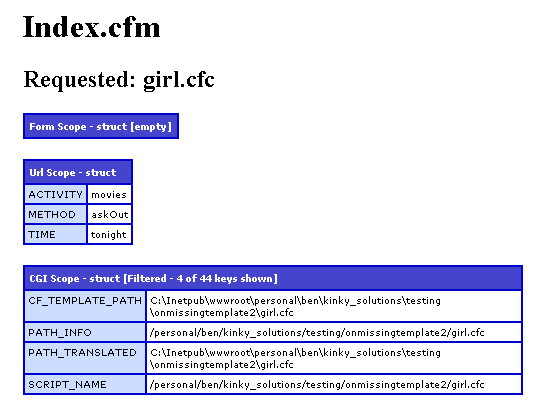
As you can see, not only does ColdFusion's OnMissingTemplate() event handler execute for CFC-based requests, the CFC shows up as the given template and all of the URL variables are available as well. Nothing major here, just demonstrating that this works with CFC pages as well as CFM pages.
Want to use code from this post? Check out the license.

Reader Comments
I've always thought this was a cool feature but not one I can work out something to do with it!
Useful information shared nicely with good concepts and helping ideas.
@Sam,
Yeah, agreed. I think URL rewriting is really the only way to go.