
Learning ColdFusion 9: The Virtual File System (RAM Disk)
ColdFusion 9 introduced a new file system, called the Virtual File System, that acts just like any drive, but exists fully in the RAM of the server. It looks, acts, and feels like a regular file system, but the difference is that it's much faster due to the fact that reads and writes to and from it don't actually involve any disk access. Other than performance differences, the only impactful difference, as Rob Brooks-Bilson points out, is that the RAM disk is emptied every time the server is restarted. Therefore, this file system is persistent, but only to a point. As such, it should only be used with transient files and not those who's existence is required over a long period of time.
The virtual file system does not exist on a per-application basis. It is a drive of the application server and as such, it is available to all applications on the same ColdFusion instance. Just as all ColdFusion applications can access the C:\ drive of the machine, all ColdFusion applications can access the ram:// drive. This means that files written to the virtual file system by one application can be listed, read, and deleted by all other applications on the same ColdFusion server. You can set up ram disk permissions via the Sandbox security, but that's a bit beyond my understanding of server management.
That said, there's really not that much to using the virtual file system - it's just like any other file system. To demonstrate it, I'm going to set up a mapping to the RAM disk in a simple Application.cfc:
Application.cfc
<cfcomponent
	output="false"
	hint="I define the application settings and event handlers.">

	<!--- Define the application. --->
	<cfset this.name = hash( getCurrentTemplatePath() ) />
	<cfset this.applicationTimeout = createTimeSpan( 0, 0, 0, 30 ) />

	<!---
		Create a mapping to the virtual file system so that we
		don't have to keep using ram:// in the relative file
		paths.

		NOTE: For absolute file paths, we STILL need to use the
		full "ram://" prefix.
	--->
	<cfset this.mappings[ "/ram" ] = "ram://" />

	<!--- Define page request settings. --->
	<cfsetting showdebugoutput="false" />

</cfcomponent>
Here, we are mapping the file path "ram://" to the root, "/ram". As with any other file system, this mapping needs to be used with tags or functions that cannot accept a full file path (ex. CFInclude, CreateObject()). Now that we have the mapping set up, let's write a file to the virtual file system and then read it back; but, just so this is not completely boring, let's write an actual ColdFusion code file to the RAM disk and then execute it:
<!---
	Create some code that we will write to the ColdFusion
	virtual file system. NOTE: We have to escape the code
	so that ColdFusion doesn't execute just yet.
--->
<cfsavecontent variable="rawCode">

	<%cfoutput%>

		<!--- Set name a date variables. --->
		<%cfset name = "Ben Nadel" /%>
		<%cfset currentTime = now() /%>

		<!--- Create message. --->
		<p>
			Hello <%=name=%>, it is currently
			<%=timeFormat( currentTime, "h:mm:ss TT" )=%>.
		</p>

	<%/cfoutput%>

</cfsavecontent>

<!--- Unescape the raw code to be proper ColdFusion code. --->
<cfset rawCode = reReplace( rawCode, "<%=|=%>", "##", "all" ) />
<cfset rawCode = reReplace( rawCode, "<%", "<", "all" ) />
<cfset rawCode = reReplace( rawCode, "%>", ">", "all" ) />

<!---
	Write the ColdFusion code to the virtual file system.
	Because the CFFile tag requires a full pall, we need
	to use the ram:// path prefix.
--->
<cffile
	action="write"
	output="#rawCode#"
	file="ram://hello_world.cfm"
	/>

<!---
	Include the transient code file that we just created. Because
	this is a ColdFusion path (not a full file path), we can use
	our ram-based mapping.
--->
<cfinclude template="/ram/hello_world.cfm" />

<!---
	Now that our transient code file has been executed, let's
	delete it from the virtual file system. Remember, since CFFile
	requires a full file path, we have to use the ram:// prefix
	and cannot use the ram mapping.
--->
<cffile
	action="delete"
	file="ram://hello_world.cfm"
	/>
In our content buffer (CFSaveContent), we create some ColdFusion code. This code has to be escaped so that ColdFusion doesn't execute as we write it. We then unescape this code, write it to the virtual file system, CFInclude it (which executes the transient ColdFusion code), and then delete the code file. Notice that for the CFFile actions, we have to use the ram:// prefix, but for the CFInclude tag, which can't use full file paths, we use our /ram mapping. When we run the above code, we get the following output:
Hello Ben Nadel, it is currently 9:02:30 AM.
If you ignore the fact that you could have done this with a regular file system, I think there's definitely some oooh-ahhh factor here. Plus, remember that since we aren't doing any actual file reads/writes, this is going to be significantly faster than using a standard file system.
ColdFusion 9's virtual file system acts very much like other file systems, but there are some limitations. For instance, you can't use any relative file addressing, not even same-directory addressing. Meaning, that if you have two file in the same RAM directory, they cannot reference each other without a fully qualified or mapped path. To demonstrate, let's create two code files and have one try to include the other.
But first, I want to create a ColdFusion custom tag that will make it easier for us to turn our escaped code into ram-based code files. If we always need to write the code to a buffer, unescape the code, and then write it to disk, we can factor all three of these tasks into a single ColdFusion custom tag:
RamCode.cfm
<!--- Check to see which tag mode we are executing. --->
<cfif (thistag.executionMode eq "start")>

	<!--- Param the tag attirubtes. --->

	<!---
		This is the file path to the RAM disk for which we
		are going to write code contained within the tag body.
	--->
	<cfparam
		name="attributes.file"
		type="string"
		/>

<cfelse>

	<!--- Get the generated content for the raw code. --->
	<cfset rawCode = thistag.generatedContent />

	<!--- Unescape the raw code to be proper ColdFusion code. --->
	<cfset rawCode = reReplace( rawCode, "<%=|=%>", "##", "all" ) />
	<cfset rawCode = reReplace( rawCode, "<%", "<", "all" ) />
	<cfset rawCode = reReplace( rawCode, "%>", ">", "all" ) />

	<!--- Check to make sure directory exists. --->
	<cfif !directoryExists( getDirectoryFromPath( attributes.file ) )>

		<!--- Create directory first. --->
		<cfdirectory
			action="create"
			directory="#getDirectoryFromPath( attributes.file )#"
			/>

	</cfif>

	<!---
		Write the ColdFusion code to the path on the RAM disk
		provided by the user.
	--->
	<cffile
		action="write"
		output="#rawCode#"
		file="#attributes.file#"
		/>

	<!--- Clear the generated content. --->
	<cfset thistag.generatedContent = "" />

</cfif>
As you can see, this custom tag, ramCode.cfm, basically takes are CFSaveContent and builds in the unescaping and the file write.
With this new ColdFusion custom tag, we can now try to execute relative-path includes on the virtual file system:
<!--- Write a simple txt file to the root RAM directory. --->
<cffile
	action="write"
	output="Message: In Root Directory"
	file="ram://message.txt"
	/>

<!---
	Create some code that we will write to the ColdFusion
	virtual file system. This code will live in the root of
	the virtual file system and include the message in the
	same directory.
--->
<cf_ramcode file="ram://relative.cfm">

	<!--- Output top-level message. --->
	Located in the ROOT directory<br />

	<!--- Include same-directory message. --->
	<%cfinclude template="message.txt" /%>
	<br />

</cf_ramcode>

<!---
	Include the transient code file that we just created. Because
	this is a ColdFusion path (not a full file path), we can use
	our ram-based mapping.
--->
<cfinclude template="/ram/relative.cfm" />
Notice that our dynamically generated ColdFusion file simply tries to CFInclude the message.txt file, also in the root of the RAM disk. When we try to run this, we get the following ColdFusion error:
Could not find the included template message.txt.
If we go back into the code and change our CFInclude to be this:
<%cfinclude template="/ram/message.txt" /%>
... which uses our mapped path, "/ram", then we get the proper output:
Located in the ROOT directory
Message: In Root Directory
So, CFInclude cannot use relative addressing; but, for some reason, relative addressing seems to work perfectly well with ColdFusion components. In this demonstration, we are going to write two ColdFusion components to the virtual file system - one to the root and one to a sub directory. We will than instantiate the root one, which extends the one in the sub directory:
<!---
	Create code for our base cfcomponent. Notice that are putting
	the Base.cfc in a sub-directory called, Core.
--->
<cf_ramcode file="ram://core/Base.cfc">

	<%cfcomponent%>

		<!--- Set a variable. --->
		<%cfset this.baseComponent = true /%>

	<%/cfcomponent%>

</cf_ramcode>


<!---
	Create our extending class. Notice that Extends attribute
	of the CFComponent tag refers to the Base class within a
	sub-directory of the current RAM directory.
--->
<cf_ramcode file="ram://Concrete.cfc">

	<%cfcomponent extends="core.Base"%>

		<!--- Set a variable. --->
		<%cfset this.concreteComponent = true /%>

	<%/cfcomponent%>

</cf_ramcode>


<!---
	Now, let's create an instance of the ColFusion component.
	Notice that we are using both the NEW operator and the
	RAM mapping to instantiate our concrete class.
--->
<cfset concreteObject = new ram.Concrete() />

<!--- Dump out our object instance. --->
<cfdump
	var="#concreteObject#"
	label="Concrete Class (via RAM)"
	/>
Notice that our base component is in the sub-ram directory "core" and our concrete, located in the ram-root, class extends "core.Base". This is relative addressing with NO mapping. When we run the above code, we get the following CFDump output:
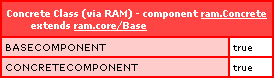
This worked perfectly well. And, notice that I am using the NEW operator in combination with the "ram" mapping to create the concrete class. I am very curious as to why relative addressing works fine for the Extends attribute, but not for CFInclude.
Now that we've done all this testing, remember that the files we created above will live on the virtual file system until the server is restarted. As such, we should probably clean up after ourselves. To do so, we can use the recursive nature of the CFDirectory tag to gather and delete both our transient files and directories:
<!---
	Gather all the files on the virtual file system - remember,
	we cannot delete directories until they are empty.
--->
<cfdirectory
	name="files"
	action="list"
	directory="ram://"
	recurse="true"
	type="file"
	/>

<!--- Loop over all the files on our RAM drive. --->
<cfloop query="files">

	<!--- Delete the file. --->
	<cffile
		action="delete"
		file="#files.directory#\#files.name#"
		/>

</cfloop>


<!--- Gather all the directories on the virtual file sytsem. --->
<cfdirectory
	name="directories"
	action="list"
	directory="ram://"
	recurse="true"
	type="dir"
	/>

<!--- Loop over all the directories on our RAM drive. --->
<cfloop query="directories">

	<!--- Delete the direcory. --->
	<cfdirectory
		action="delete"
		directory="#directories.directory#\#directories.name#"
		/>

</cfloop>
That's really all there is to it - ColdFusion 9's virtual file system is very much like any other file system, except for that it's much faster due to its in-memory nature. It's this performance gain that really serves as the reason-to-be for the ram disk. Because interactions with it are so fast, it's the perfect file system for use with intermediary files like uploads and images that are being processed. Of course, you must always keep in mind that this file system is part of the server's RAM and as such, it is a much more limited resource than that of the hard drive. Use with caution.
Want to use code from this post? Check out the license.

Reader Comments
This is my favorite feature of CF9! Also, Railo has the VFS, so code using this functionality is portable.
I have a lot of use for this functionality in existing apps and am sure I will find new uses for it in the future. Thanks for showing it off Ben!
@TJ,
I'd be curious in what you find the best use-cases to be. How do you leverage it?
@Ben
I generate a lot of PDFs for a couple of systems. The PDFs do not need to be saved to the file system, rather they are generated and delivered to the user and then removed from the file system. This of course, previously generated a lot of I/O on the disk. By moving this to VFS the disk I/O is now near zero and performance has increased significantly.
I've also found it very useful for Flex apps. I can have the user upload a small image file to the server named with a UUID, store it in VFS and then pass the UUID back to the UI. The UI then makes a call to a service when the record is submitted, gets the temp file from VFS and stores it as a binary in the database, then removes the file from VFS. Again, this is all to avoid unnecessary disk I/O
@TJ:
You're going to need to be careful w/using the VFS for PDF creation (or any process that can potentially create a *large* file.)
While the VFS will certainly boost performance, you have to be very careful w/the memory ramifications because you have the potential to go through your JVM's allot memory very quickly.
Just something to think about if you have either really high PDF creation volume or are dealing with potentially large files.
@Dan,
I think the size of the RAM is going to be the first thing that bites people in the butt. I've got 2 gigs of ram... and 100 gigs of harddrive space. As such, I'm not yet conditioned to think about size limitations.
Hi Dan, thanks for the advice.
It has been a consideration in all the designs where we use the VFS. We are talking about PDFs with an average size of 100k and servers with 16GB of RAM dedicated as CFML servers... and the loads are not huge.
If we were discussing extremely high volume servers with large PDF files I would either consider another method (disk paging) or significantly increase the amount of RAM.
@TJ:
I'm sure you aware (but just in case and for those reading the blog that may not be aware,) but just remember that unless you're using a 64-bit JVM, no matter how much RAM the server has, you're limited to approximately 2GBs for the JVM.
Since that RAM is going to be shared by all resources w/in ColdFusion, you can quickly eat through all the available memory--especially since PDF (and image) operations tend to eat up need a lot of memory to perform their operations.
@Dan,
I was not aware of that aspect. Thanks for the insight. The JVM is voodoo as far as I'm concerned.
Agreed Dan, and people should also be aware that's going to require a 64bit OS and 64bit CFML server as well. At this point everything we run is W2k8 x64 Server with x64 IIS7 and x64 CF.
We are starting testing on a completely open source stack as well, but don't have full results yet.
@Ben
This opens up so many new possibilities. Added security, more manageable downloads. It's INSANE! I use to love PHP but now I love coldfusion I mean who doesn't?
@Jody,
Word up!
One point I did forget to reiterate. Ben mentioned that
"Just as all ColdFusion applications can access the C:\ drive of the machine, all ColdFusion applications can access the ram:// drive."
With the filesystem you can mitigate security risks with systems permissions (running multiple CF instances under different user accounts) or the CF sandbox. You cannot set any permissions on the VFS, so all security is left to the sandboxing methods. This means you probably would not want to store any sensitive info in VFS on a shared server.
Is this a real OS-level filesystem, or is this simply ColdFusion trickery?
Will 'java.io.File.listRoots()' include this drive? Will this integrate well with non-CF programs and libraries?
@Ben understanding the workings of the Java stack (including language, libraries, and virtual machine) is very important for understanding the workings of ColdFusion. Treating the JVM as a magic black box is a first step on the road to confusion.
@Justice,
I'm not going to argue that knowing more about the JVM isn't a good thing - I have to believe it absolutely is a good thing, and something I wish I knew more about; but, I do think that saying that not knowing about it will lead to confusion, is a bit strong. After all, so much of what ColdFusion is all "about" is shielding the end user from having to know about the more complex aspects of programming and server interaction.
That said, when I dump out the root list, I get this:
C:\
D:\
E:\
F:\
G:\
H:\
... so it looks like no RAM disk is their. But, I guess that makes sense - it's not making a new drive - it's making a new memory space.
FYI, I just ran some speed tests on this and the virtual file system appears to be about 400% faster:
www.bennadel.com/blog/1651-Learning-ColdFusion-9-Virtual-File-System-vs-Actual-File-System.htm
Someone got CF working in the "cloud", didn't they? I wonder if that changes the way this works or even the speed gains.
reading the notes about ram:// being global,
why aren't these scope specific
server://
session://
request://
application://
makes a lot more sense to keep to existing concepts, plus it avoids collision with darn sandbox settings...
@Zac,
That's a very interesting concept. I kind of like it.
@Zac, did you make a feature request on Adobe's forum for scope-specific VFS? If so, can you post a link cause I'll second that.
@Ben, I believe that you are correct with saying that ColdFusion is designed for simplicity in use (which is what makes it so easy to pickup), however not knowing the JVM (and server abilities) CAN lead to confusion; especially with advanced features, as demonstrated with the memory limitations of 32bit OSs.
This is my personal belief and am not having a go at anyone, but it really comes down to how much you use ColdFusion (ie: Professional vs Novice), how passionate you are about what you do and how much time you want to save yourself attempting to debug an obscure gotcha, as to whether learning the server details is worth your time.
In saying all that, good documentation of functionality (and reading it) can limit gotchas.
On another note, I am curious the difference in latency with VFS vs solid-state hard drives.
bug posted, please vote for it,
personally I think having a request level VFS scratch space is brilliant
http://cfbugs.adobe.com/cfbugreport/flexbugui/cfbugtracker/main.html#bugId=78909
Jeez that flex app is painful compared to HTML, that bug tracker is NQR
@Andrew,
So, are you saying that I'm a novice ColdFusion developer? :P
@Zac,
I voted for it. I think the idea of Server, App, and Request are great. Session, I'm not sure that would be hugely useful. But, definitely gets my thumbs up.
@Ben,
Not at all; I believe your awesome posts prove the opposite. I was merely putting forth my beliefs on 3 deciding factors to whether or not someone might want to learn the limitations of the server.
Ben, how long data can be stored in memory? and how it can impact on performance, I mean by putting a big amount of data it can potentially impact on server performance, is there any "garbage removal" process available or it should be handled manually?
@Andrew,
I really would like to learn more about the JVM, I'm not gonna lie about that. Maybe I just need to find a good primer on it.
@Misha,
From what I have read, there is no garbage removal other than restarting the service. I wouldn't plan on storing anything in there long term. I believe the intent is more for short term, intermediary data storage.
Ben/All: I have my local development server running all the time, but I'm seeing the files on my ram disk disappear after a while. Anyone else running into this?
I have a page that just does a cfdirectory list of ram:// and dump it out. If I put a couple files on the ram disk and run this page, I see them listed. Then I come back a few hours later and run the page - the files are gone.
that will always happen with the ram based stuff.
You can set a higher timeout in the CF administrator, but you should consider ram like the session of application scope, ie not persistant
Seeing this i'm kind of thinking if i can use this virtual system for PDF generation using the DDX stuff(like Merging).
As of now DDX needs a file system to work with .. in CF.
I could not try the CF9 yet. Any comments?
@Sanjeev,
That sounds good to me. I know there were some limitations on what could and could not be used in the RAM disk, but I cannot remember what they are at the moment.
I really like the idea of scope specific files in ram. I wonder if a work around would be to use directories like:
ram://request/
ram://session/
ram://application/
Then use onRequestEnd, onSessionEnd, onApplicationEnd, etc to recursively delete files in those directories. Think I'll go try it out :)
Didn't think through it enough. The directories need to be specific to the request, application name, and a session identifier. Still might work. The wheels are turning.
I have created a virtual drive called Z.But I don't upload file(image) with Coldfusion9.
I could not find how to write the file path.
<cfset upload_folder =( ".....")">
<cffile action = "upload"
...>
Thank you for this article, it has really helped my application. One question, in Adobe's documentation:
http://help.adobe.com/en_US/ColdFusion/9.0/Developing/WSe9cbe5cf462523a0-70e2363b121825b20e7-8000.html
they use RAM:/// instead of your RAM://
What is the difference between the 2 and 3 slashes
I'm working on something like your example. Its for a post form submission page where the user can configure the page to use formatting functions (like dateAdd(), capitalize() etc etc).
I am generating the CFML that needs to be executed on the fly and then writing the file to the ram disk and including it.
What I am wondering is:
1. If this happens say 10,000 times a day, even if the file is deleted immediatly from the RAM disk, would you foresee any problems?
2. Do I need to manually delete the generated class file from the cfclasses directory after each request aswell?
What do you think?
Ben, one of the most important lessons I've learned along the road to becoming a ColdFusion developer is that the answer to almost any problem I've encountered can be found in one of two places - Ray Camden's site, or yours.
Last year I began storing some frequently used images as blobs in a database table, and it's worked out very well. The problem, however, has been that I haven't found a good way of returning an image from a function in a CFC. I've spent an insane amount of time looking for an answer. Sure enough, all it took was the correct search term and I finally found my answer right here. Thanks for all the hard work and your dedication to sharing your knowledge.
As a side note, I've become a huge fan of ColdFusion's image processing capability, but I'm frustrated at the lack and poor quality of Adobe's documentation. It seems to me that there's probably room in the market place for a dedicated book on the subject.
Hey Everyone,
Has anyone tried accessing the VFS from a .jsp page or custom java class that is called from a .cfc?
I was just currious about this because I'm working with the Microsoft EWS API which integrates Exchange 2010 with Java. I would like to add attachments to an email without using a byte[]. One of the overridden methods provides a means to access the file system, but in a shared environment, this wouldn't be optimal. Instead, using the VFS would be a great workaround! Figured I would ask before I tested.
Thanks for your thoughts,
Matt
It seems that OpenOffice doesn't recognize VFS.
I saved a docx file in a ram:\\ folder, and tried to convert it into a PDF file using cfpdf, but I got this error.
The following exception occurred while converting ram://pdfTempFiles/5\1DF91BE6-4061-86E3-F79818A2B84320AB.docx: com.sun.star.lang.IllegalArgumentException: URL seems to be an unsupported one.
O, I mean "cfdocument" not "cfpdf". Cfdocument threw error when it tried to convert a docx file in a VFS into a pdf file. The error message was "URL seems to be an unsupported one".
Some Cf tags use OppenOffice, but VFS is not supported by OpenOffice. Be careful.
We're getting the "URL seems to be an unsupported one" error when we convert uploaded documents via cfdocument. (We're not using the VFS, but this is the only page I could find mentioning that error happening with CF.)
It seems to happen randomly, and has nothing to do with the file uploaded. (Trying again results in success, and opening the file directly in Open Office works fine.)
We save uploaded files to another server and then convert them and do other stuff with them, so my only guess is that it has to do with Open Office on the web server being unable to access the file on the other server. We tried throwing our code in a try/catch block and waiting 1 second when an exception is thrown before trying again, but it still happens.
The other server is hosted on the same physical host, and the issue can affect files as small as 4 bytes (a simple TEST text file), so I don't think we'd need to wait longer than 1 second if it was an issue with the file being locked or not fully copied to the other server yet.
It's bizarre.
Hi everyone..
I have a c# application that generates data every second, which I need to pass to Coldfusion, instead of writing the data to a csv file and reading it with Coldfusion every 1 second, I wanted to get the c# application to write it to a memory mapped file and have Coldfusion access that memmory mapped file.
Does anyone know of a way for Coldfusion to access the memory files ?