
Getting One Record Per Group From A One-to-Many Join
Often times in an application, I have wanted to output a simple list of items that have a one-to-many relationship with other items in the database. One scenario that I come across very often involves attorneys and offices; many attorneys will work out of more than one office, but in an attorney directory, they only want to be listed with their primary office. This is an easy query IF (and only if) "primary office" is explicitly defined using some sort of "is_primary" flag or "sort" indicator, but often times, this filtering is not available.
As such, if you were just to create the SQL JOIN between attorneys and offices, you would get a lot of duplicate names (one for each office relationship), but this is way too much data. Yesterday, I was dealing with a very similar situation and was convinced that I could do all of this in a single query, rather than use query of queries or output shenanigans. What I came up with works, but only with small sets of data; it is not a very efficient method and should be avoided when dealing with large data sets.
To explore this idea, let's create the SQL tables we are going to be used. For this demo, I am going to be using a Contact table and Phone table. The contact table holds people's names. The phone table holds associated phone numbers:
<!--- SQL to create and populate the data tables. --->
<cfsavecontent variable="strSQL">
	<!--- Create table for contact data. --->
	DECLARE @contact TABLE (
		id INT IDENTITY( 1, 1 ),
		name VARCHAR( 20 )
	);

	<!---
		Create table for phone data (each phone number will be
		associated with exactly one contact).
	--->
	DECLARE @phone TABLE (
		id INT IDENTITY( 1, 1 ),
		name VARCHAR( 20 ),
		ext VARCHAR( 7 ),
		is_preferred BIT,
		contact_id INT
	);


	<!--- Populate the contact data. --->
	INSERT INTO @contact
	(
		name
	)(
		SELECT 'Ben Nadel' UNION ALL
		SELECT 'Maria Bello' UNION ALL
		SELECT 'Jodie Foster' UNION ALL
		SELECT 'Christina Cox'
	);


	<!--- Populate the phone data. --->
	INSERT INTO @phone
	(
		name,
		ext,
		is_preferred,
		contact_id
	)(
		<!--- Ben's numbers. --->
		SELECT '212-555-BEN1', '', 1, 1 UNION ALL
		SELECT '212-555-BEN2', '123', 0, 1 UNION ALL
		SELECT '212-555-BEN3', '', 0, 1 UNION ALL

		<!--- Maria's phone numbers. --->
		SELECT '917-555-MAR1', '', 0, 2 UNION ALL
		SELECT '917-555-MAR2', '', 0, 2 UNION ALL
		SELECT '917-555-MAR3', '', 0, 2 UNION ALL

		<!--- Christina's phone numbers. --->
		SELECT '202-555-CHR1', '', 0, 4 UNION ALL
		SELECT '202-555-CHR2', '15', 1, 4
	);
</cfsavecontent>
As you can see from this SQL code, we have 4 contacts. Three of them have phone numbers and only two of them have a phone number flagged as "preferred". This means that the "preferred" phone number will not always be easy to access, such as with Maria Bello, who has three numbers but no preference.
Before we get into anything tricky, let's look at a standard JOIN that would bring back both contacts and phone numbers:
<!--- Query for contacts and their phone numbers. --->
<cfquery name="qContact" datasource="#REQUEST.DSN.Source#">
	<!--- Create the SQL data tables and populate. --->
	#PreserveSingleQuotes( strSQL )#

	<!--- Select contacts as their numbers. --->
	SELECT
		c.name,

		<!--- Phone data. --->
		( p.name ) AS phone_number,
		( p.ext ) AS phone_ext,
		(
			ISNULL(
				p.is_preferred,
				0
			)
		) AS is_preferred
	FROM
		@contact c
	LEFT OUTER JOIN
		@phone p
	ON
		c.id = p.contact_id
	ORDER BY
		c.name ASC
</cfquery>


<!--- Dump out contacts and their phone numbers. --->
<cfdump
	var="#qContact#"
	label="Contact Phone Numbers"
	/>
As you can see, we just join the two tables based on the associated contact_id. Running the above SQL code, we get the following CFDump output:
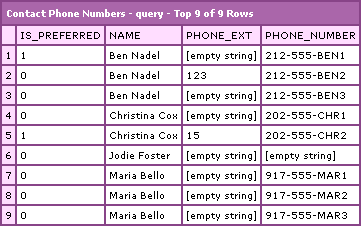
In this query, we are getting back all contact-phone number associations. For a simple list, however, we don't want that; we only want one contact with a max of one phone number.
If we always had a preferred phone number or had some sort value that was always defined, getting this data would not be a problem - we would just add the sort=1 or is_preferred=1 logic to the LEFT OUTER JOIN. However, as you can see, that can't be done in our example. To get around this, our LEFT OUTER JOIN logic has to get a bit crazy. As part of our join, we want to only get the phone number that is most preferable (which does not mean is_preferred).
Before we look at the overall query, let's think about how we would get the most preferred number for any given contact. Well, we want to prioritize the phone numbers that are flagged as is_preferred. Of course, if that is not defined, or that is always zero, then we need to make an arbitrary decision and say that the first phone number created (as dictated by the auto-incrementing ID) is the most preferred.
Taking that logic, if we wanted to get the most preferred number for contact (ID:1), we would run SQL like this:
SELECT TOP 1
	p.id,
	p.name,
	p.ext,
	p.is_preferred
FROM
	@phone p
WHERE
	p.contact_id = 1
ORDER BY
	p.is_preferred DESC,
	p.id ASC
This will return one (or zero) phone records with the most "preferred" number for contact:1. Now, we want to take this logic, and integrate it into our SQL LEFT OUTER JOIN logic:
<!--- Query for contacts and their phone numbers. --->
<cfquery name="qContact" datasource="#REQUEST.DSN.Source#">
	<!--- Create the SQL data tables and populate. --->
	#PreserveSingleQuotes( strSQL )#

	<!--- Select contacts as their numbers. --->
	SELECT
		c.name,

		<!--- Phone data. --->
		( p.name ) AS phone_number,
		( p.ext ) AS phone_ext,
		(
			ISNULL(
				p.is_preferred,
				0
			)
		) AS is_preferred
	FROM
		@contact c
	LEFT OUTER JOIN
		@phone p
	ON
		(
				c.id = p.contact_id
			AND

				<!---
					As part of the JOIN condition, make sure
					that this ID of the phone record we return
					is equal to the *most* preferred one for
					that user.
				--->
				p.id = ISNULL(
					(
						SELECT TOP 1
							p2.id
						FROM
							@phone p2
						WHERE
							<!--- Tie to current user record. --->
							p2.contact_id = c.id
						ORDER BY
							p2.is_preferred DESC,
							p2.id ASC
					),
					0
				)
		)
	ORDER BY
		c.name ASC
</cfquery>


<!--- Show contact with max of ONLY one phone number. --->
<cfdump
	var="#qContact#"
	label="Contact Phone Numbers (Max: 1)"
	/>
Now, our LEFT OUTER JOIN logic not only joins based on the contact ID, it also requires that the ID of the phone number in the join be the ID of the most preferred phone number for that contact. Running this code, you see that we get a much better and more useful query result set:
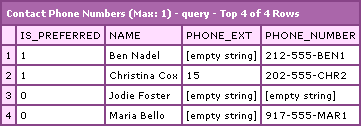
This query is easy to work with, in terms of results, but like I said, this is only good for small sets of data. Anytime you make a sub query be part of you JOIN logic, whether it's an INNER or OUTER JOIN, you've got problems; that's a lot of look-ups to perform and the query is going to be slow. But, like I said, if you just need a simple list with one record per group in a one-to-many query, this is an option that I discovered yesterday.
Want to use code from this post? Check out the license.

Reader Comments
That UNION ALL trick is rather convenient, isn't it?
How about this one:
Instead of the line-by-line join that yours used, this one tries to grab the best phone number for every contact all at once. The COALESCE() sets up two choices:
The "r" subquery then has the best number for each contact, and we join again to [phone] to get the details for the number.
@Rick,
I formatted your SQL statement so I could read it. Very clever stuff. I like it cause you are using the subquery to create an intermediary table that is not row-specific, so you lack the overhead that my ON-clause subquery has. Very slick.
Also, I am pretty sure I learned that UNION ALL trick from you a long time ago. If I didn't say thanks then, THANK YOU now - it has made testing SQL stuff insanely easy :)
Rick, why are you so clever?!?
check this 1 out:
@Peter,
I formatted your code snippet so that I could better read it (I hope that you don't mind).
In yours, I am not sure that you can get the phone Ext if is not preferred. Your ON clause will exclude the record for non-preferred items. But then, your select clause only makes up for the phone_number, not the Ext field.... I think.
Yes, you're right. The extension would require another subquery just like the phone number.
Oh well, thought I'd give it a shot.
P.S. Thanks for formatting.
Peter
@Peter,
No worries. The more people we have look at / taking shots at a solution, the better then end result will be. Thanks for taking the time to give it a go.
Bless you!!!! I needed help with getting the top record only for a join and this helped!
Nice trick, I needed it and found it after a Google search.
Thanks from the Netherlands
@Koek,
Awesome. Glad to help out.
Hi,
Is it possible to have the query to return the phone numbers on one line for each worker. Reason I ask, as we have items with multiple prices and management want each item with its' seven different prices on one line. Basically to return the one to many within each line returned.
Most appreciated if you can help. If not, thanks all the same.
Regards, Steve
@Steve,
If you are using MySQL, I believe they have a CONCAT_GROUP() method for GROUP BY aggregates which does something like that. I have not tried it personally (nor do I know how that might be accomplished in other engines).
This is more or less what I am looking for. Once you bring in a second table the SQL code starts to get more complicated.
This should be a big help. Thanks.
@Tony,
Awesome my man. Hope it worked out nicely.
Thanks, that got me on the right track :)
@P-L,
Sweeeeet.
the query is fine but not useful for me, if i want result based on some parameter then how can we do this,if add mobile no on your phone table the customer can have multiple phone no and mobile no, i need result based on phone no and mobile no, suppose phone no which i will pass it's match with first row of phone table and mobile no match with second table then how can we get the result?
@Ben
It surprises me how many times I've ended up on your site looking for information. I appreciate your solutions and expertise and I don't even use Cold Fusion. Thanks.
@Manas
If you're storing a mobile AND land line numbers in a table, chances are you don't store both in the same record. You'd normalize and create a "phone_type" field.
Then looking at the example Rick O did with the derived table, you'd take the existing derived table and add a clause that makes it look up only the "Land Line" records. Then you could copy that derived table, give it a different alias and have it only look up the "Mobile" records.
Here's a stab at an example. It appears to work.
SELECT
c.name,
p.name AS phone_land_number,
p.ext AS phone_land_ext,
COALESCE(p.is_preferred, 0) AS is_preferred_land,
p2.name AS phone_mobile_number,
p2.ext AS phone_mobile_ext,
COALESCE(p2.is_preferred, 0) AS is_preferred_mobile
FROM
@contact c
LEFT OUTER JOIN
(
SELECT
contact_id,
COALESCE( MIN(CASE WHEN is_preferred = 1 THEN id END),
MIN(id)
) AS phoneid
FROM
@phone
WHERE phone_type = 'land'
GROUP BY
contact_id
) AS r
ON
(c.id = r.contact_id)
LEFT OUTER JOIN
(
SELECT
contact_id,
COALESCE( MIN(CASE WHEN is_preferred = 1 THEN id END),
MIN(id)
) AS phoneid
FROM
@phone
WHERE phone_type = 'mobile'
GROUP BY
contact_id
) AS mob
ON
(c.id = r.contact_id)
LEFT OUTER JOIN
@phone AS p
ON
(r.phoneid = p.id)
LEFT OUTER JOIN
@phone as p2
ON
(mob.phoneid = p2.id)
ORDER BY
c.name ASC
@Ryan,
Thanks my man - I'm glad that I can provide value. And thanks for the cool SQL; this kind of advanced stuff is cool.
Very useful article, gave me ideas to solve a similar problem in MySQL.
i really appreciate it, thanks for a great solution.
Hey Ben,
Just needed this exact implementation as I build a homebrew CRM -- so your example was perfect. Once again it pays to read your articles from top to bottom, as you do a great job explaining it all.
Hope all is well with you!
Jon
How about:
select c.name,
<!--- Phone data. --->
( p.name ) AS phone_number,
( p.ext ) AS phone_ext,
(
ISNULL(
p.is_preferred,
0
)
) AS is_preferred
FROM
@contact c
LEFT OUTER JOIN
@phone p
c.id = p.id
group by c.id
order by is_preferred, p.name
Hey Ben,
I was stuck in similar problem nature.
In my database,
Parent Table has 1497039 records
Child Table has 1177925 records
My approach was taking 2 min and 20 sec and after implementing the technique my query ends up in just nano seconds.
Thanks man!
Naveed Ahmad.
Great masters have gathered here. Pupils like me can only put that page into Favorites and mark it "Special" ... and make a back up copy of the Favorites' folder.
Here is a different and more efficient way to do this (from StackOverflow post referenced below (I have not added the additional select * with the appropriate where clause)):
Example:
user1 CategoryA 10
user2 CategoryA 11
user3 CategoryA 9
user4 CategoryB 3
user1 CategoryB 11
the query would return:
Rank User Category
1 user2 CategoryA
2 user1 CategoryA
3 user3 CategoryA
1 user1 CategoryB
2 user4 CategoryB
SELECT
Rank() over (Partition by Category Order by Value, User, Category) as ranks,
Category, User
FROM
Table1
Group By
User, Category, Value
Order by
ranks asc
http://stackoverflow.com/questions/1139719/sql-server-query-for-rank-rownumber-and-groupings